The record
On the Mac
Albumary's app screens are currently shown in English.
One rule runs through all of it: the thing under your cursor is the thing you act on. There is no selection, no highlighted item, nothing to keep track of. Where you're pointing is the target. Learn that once and the rest follows without being taught.
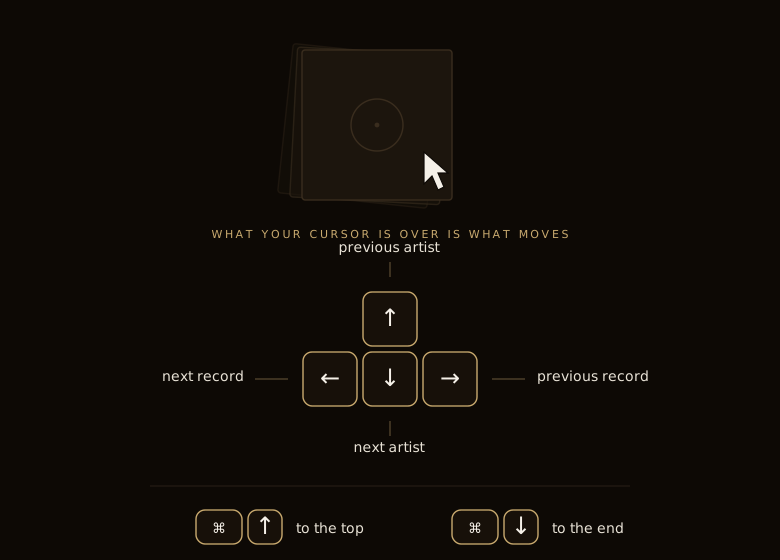
Move through a crate with the arrow keys. Left and right flip the stack you're pointing at, one record at a time — the same flip a swipe would give you. Up and down step by artist: not one record at a time but one name at a time, jumping the pile you're over to the next. It's the coarse move to the arrows' fine one, and it stops somewhere meaningful rather than nowhere in particular.
Hold any of them down and it keeps going — records or artists going past under the key the way they'd go past under your thumb. It's a riffle, worked with a finger on a key instead of on the crate.
Add Command and you go all the way. Over a stack, Cmd-↑ and Cmd-↓ take you to its first and last record. In the gutter between crates, or in a room without crates, they take you to the top and bottom of the room instead. Same rule as everything else — it depends on what you're pointing at.
The scroll wheel obeys the same rule, and turns the stack under the cursor.
Getting back out
There are three ways out of something, and they're three different distances.
The ✕ puts it back one step. From the printed notes to the back cover; from the back cover to the crate. It undoes the last thing you did rather than everything you did.
The house takes you back to the room — all the way out in one move, without walking back through the steps you came in by. It's for when you've gone three deep into a record and want to be standing on the floor again.
And you can always just push it away. Swipe it down, or tap the room behind it. Whichever you reach for, they all do exactly the same thing — there is no wrong one, and none of them does something subtly different from the others.
Nothing you close is remembered in a half-open state. Open it again and it's fresh.
Back out, and out
Escape is the ✕ under your hand — one level back, every time, and it never closes the window.
Cmd-W leaves the shop. The window goes, the app stays running, and the Dock reopens it. Two different jobs, and the store is careful not to confuse them: one is putting a record back, the other is walking out of the door.
Space is play and pause, wherever you are, acting on whatever's actually sounding. The one exception is when you're typing — in the search field a space is a space, as it is everywhere on a Mac.
None of these can be reassigned, and that's deliberate. The store has one set of hands.